
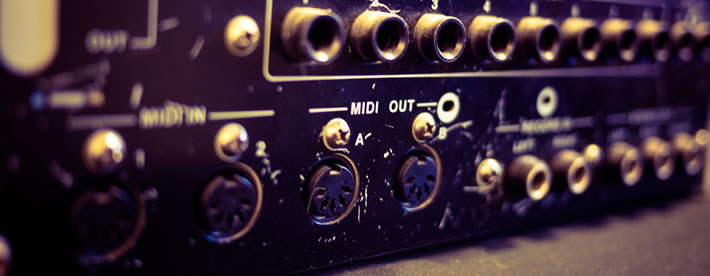
Initially, the concept of MIDI can be confusing, but hopefully in this tutorial you will realise that MIDI is pretty simple and has many uses. In this article I’ll also be looking at the hardware configuration side of the most common two MIDI set ups, that of using the MPC to control a sound module, and of syncing the MPC to a computer DAW.
What is an MPC Sequencer?
Many people know that the MPC is a sampler capable of recording audio from a variety of sources. But in reality sampling is perhaps the weakest individual aspect of the MPC, because only the MPC4000 has a fully-fledged sampling engine and OS (thanks to it containing all the sampling features of a Z-series sampler). However, at the heart of every MPC is a powerful, intuitive sequencer.
What is a sequencer? It’s a device for recording data about musical events, rather than recording the actual audio itself. With a sequencer, you do not record the actual sounds from the performing instrument, you simply record note data ‘instructions’, which can consist of pitch, volume, length etc as well as the timing of that note in relation to other notes. Once you’ve recorded your sequence, you can then play back these instructions to the MIDI instrument and the instrument itself will play back the audio based on the instructions you send it.
In a typical MPC, sequencer events are either recorded on ‘MIDI’ tracks or ‘DRUM’ tracks. MIDI tracks are used to send out these MIDI instructions to external MIDI sound devices such as sound modules, other samplers, keyboard synths, and probably most commonly these days, a VST software instrument within a computer host .
DRUM tracks also store sequencer events, however these sequencer instructions are not used to trigger sounds from external sources, they are used to trigger sounds from your MPCs own DRUM programs. But the idea is the same, although the data looks very slightly different.
So, an example of sequencer information in plain English would be something like this:
“At the start of Bar 2, play a low C note for exactly one bar, at a velocity of 50”
This information is what your MPC will store in its sequencer, but in a more structured, numerical format. So for example, the above information could be represented in your MPC as follows:
002.01.00 N:36 (C1) D:384 V: 50
Where
- 002.01.00 represents the current position in the sequence (start of bar 2)
- N:36 (C1) represents which MIDI note to play (MIDI note 36 which is C1, the low C)
- D:384 represents the duration of the note played (384 sequencer ticks, which in the 96 ppqn resolution of most MPCs represents a length of 1 bar)
- V: 50 represents the velocity value, i.e. how hard the sound is hit (which can be anything between 1 and 127)
If on the other hand you are simply triggering a pad event within a DRUM program, the sequencer information would look like
002.01.00 P:A02( 36) T: 0 D:384 V: 50
As you can see it’s similar, except this time because we are just triggering what is effectively an ‘internal’ sound module, the MPC just refers to the specific pad (P:A02, which is assigned MIDI note 36, C1). Plus there’s an additional, MPC specific parameter (T: 0) which is what can control the tuning of the pad, but that’s not important to this tutorial).
Understanding MIDI
But as you can see, the above information is very generic and is certainly not audio! So, to make a sound from this information, you have to send this information to a piece of equipment that is capable of reading this data and knowing that this data is an instruction to play a ‘C note’.
This data stored in your MPC sequences is referred to as MIDI data, which is a standardised form of information storage and transfer, developed to allow instruments and sequencers to talk to each other in a common language. MIDI stands for Musical Instrument Digital Interface. MIDI data is stored in MIDI sequences and the data is sent to other devices via MIDI cables plugged into each devices’ MIDI ports.
It’s very important to understand one thing – Midi does not record, store or carry audio data, it only deals with instructional data that tells an audio playback device which sounds to play.
The MPC can record MIDI data to its sequencer by either manually programming the notes in via STEP EDIT or GRID EDIT, or they can be recorded in real time using the pad or an external MIDI controller (see below). Once that data is saved into the sequencer you can hook up any MIDI instrument that is capable of emitting sound and get the MPC sequencer to ‘command’ it play audio based on the instructions saved in the MPC sequencer.
For your MPC to transmit and receive MIDI data to and from other devices, you will need to use special MIDI cables connected to the MIDI ports at the back of your MPC and to the MIDI ports of the devices sending or receiving the MIDI data. MIDI cables actually allow the sending of up to 16 different MIDI signals through that single cable. We say that the data is sent over different MIDI channels.
What Are MIDI Channels?
Each track in an MPC sequence can be assigned to output MIDI over a specific MIDI channel, so a ‘bass’ track can be sent via MIDI channel 1, the piano track can leave via MIDI channel 2 and so on. Equally the receiving MIDI device can be set ‘process’ these incoming MIDI channels separately and can route each one to a suitable sound. So, if your sound module receives MIDI data on channel 1, you can tell it that channel 1 must be routed to a specific bass sound. Data received on channel 2 must be routed to a specific piano sound.
Hence if we have a 16 track MPC sequence, each track can be assigned a unique MIDI channel and hence the MPC will output all 16 unique tracks of data to the sound module – the data in each channel remains separate to the other channels, it’s not merged. Hence we can play 16 different sounds from our MIDI sound module simultaneously, assuming the sound module is configured to know which channel needs to be routed to which sound.
And if your MPC has enough MIDI output ports, you can transmit up to 64 channels of completely separate MIDI data to one or multiple MIDI devices. This is because each track in your MPC sequence can be routed to a specific MIDI output port (commonly A, B, C or D on larger MPCs), a specific MIDI channel (1-16), and there are a maximum of 64 tracks in each sequence.
So let’s look at the hardware hook up basics for the two most common MPC MIDI requirements.
Playing a VST Instrument Via MPC MIDI
Let’s assume you already have a MIDI performance loaded into your MPC sequencer, and you want the MPC to playback the sounds from a VST instrument loaded up in computer software like Reason. To do this you need to connect your MPC MIDI OUT to your computer’s MIDI input using a standard MIDI cable.
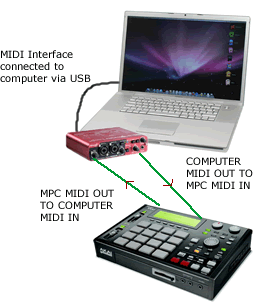
Computer MIDI Connections
Most computers do not have built in MIDI connectors so you will need to add them. This can be done by using either a MIDI interface or a combined audio/MIDI interface which would also provide a high quality audio recording system. These devices are typically connected via USB, firewire or internally via a PCI connection.
Now when you play back your MPC sequence the MIDI data is sent to your computer and routed to the Reason VST instrument which will then play the actual audio. Of course you’ll first have to configure Reason on a software level to accept the incoming MIDI (i.e. configure your MIDI interface to work with Reason, set the MIDI channels to route to the correct VST instruments etc), but that’s beyond the scope of this article. If you need to learn the exact specifics on how to configure your MPC and computer to use DAWs such as Reason, Ableton, Pro Tool or Logic as MPC sound modules, I’ve written several books on this subject.
Inputting MPC MIDI Data With MIDI Control Keyboard
While you can use your pads to input MIDI data into the sequencer, there is nothing stopping you using any other external MIDI capable device to do the same. An external MIDI controller can be used to record MIDI data directly to a MIDI track in your sequence, or it can even be used to trigger samples assigned to a DRUM program, as each pad in an MPC program is assigned its own MIDI note (we’ll cover that in a different article!).
Why use a control keyboard instead of your pads? Well the pads are fantastic many purposes (e.g. finger drumming, rapid repeats, general input), they are not so great if you want to record, for example, a complex piano performance into your MPC sequencer. Keyboards also have an extended range beyond the typical 64 pad range found in most MPCs (remember you will often be triggering an external module, so are not limited to only 64 sounds, most sound modules have virtually infinite note ranges).
A MIDI control keyboard is simply a keyboard that can be used to transmit MIDI data, it has no actual sounds inside it. It has no MIDI input port, only MIDI output. Set-up is simple. All you do is connect one end of a MIDI cable to the MIDI out port of the control keyboard and the other end to the MIDI IN port of the MPC (I would connect to MPC MIDI port 1 by default).
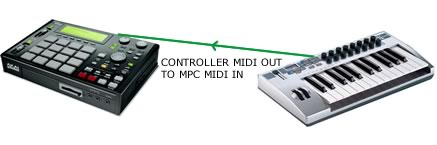
Notice in the above diagram that there is no audio connection to the MIDI control keyboard, there’s only a MIDI connection to the MPC. When you play a key on your keyboard, the note you play will have all the properties we discussed earlier (MIDI note, length, duration, velocity etc), and often many others such as expression data. All this information about the note you are playing is sent down the MIDI cable to your MPC’s MIDI input.
If you have a sample program assigned to your current sequencer track, this incoming MIDI signal will trigger the sounds in that program. Alternatively if your MPC is connected to an external MIDI sound source (we’ll see how to later), then this incoming MIDI data is actually passed along to the external sound module, which will in turn lead the sound module to playback audio. And throughout this entire process, you can also have your MPC simultaneously recording this incoming MIDI data to a sequencer track.
Combining The Two
So combining the two examples so far, we can play MIDI data into our MPC and in turn simultaneously trigger the sounds of a computer VST instrument using the set up below:
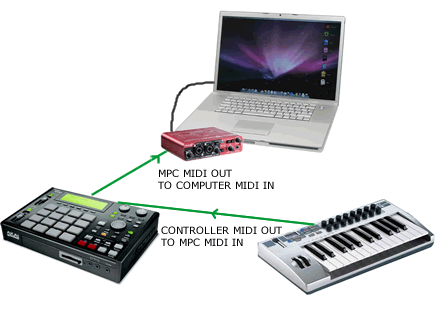
So you play a note on the control keyboard which sends the MIDI data about that note to your MPC sequence track. You configure that track to output MIDI over a specific MIDI channel which in turn is transmitted to your computer’s MIDI interface and routed to your VSTi, where it plays this MIDI note as audio.
All this time, you can also have your MPC sequence recording these events to the MPC sequencer (i.e. REC AND PLAY START), so at a later date the entire performance can be replayed using the stored MIDI data.
Syncing Your MPC With A Computer DAW
When ‘tracking’ your MPC beats for final mixdown, it’s common to to record both the audio and MIDI data into a computer DAW such as Pro Tools or Logic Pro. As part of this process, many producers will use MIDI to ‘sync’ their MPC and DAW together. What is MIDI sync? Well, it’s yet another signal that gets sent over a MIDI cable, completely separately to the 16 channels of note event data. MIDI sync messages allow two or more MIDI devices to ‘lock’ together so they play back at the same tempo and also allow one device to control the other’s playback (STOP, START, FORWARD, etc).
MIDI sync comes in a few ‘flavours’, and I cover this in more detail in this tutorial. When it comes to syncing, one device normally does all the ‘controlling’ and is referred to as the master. The device being controlled is the slave.
With the MIDI cable set up discussed so far, where the MIDI cable is going from the MPC MIDI OUT to the computer MIDI IN, we are already set (from a hardware perspective) to have the MPC as the MIDI sync ‘master’, because that MIDI cable will send the MIDI sync protocols to the computer.
However some DAWs require that they are the master. Also, transport protocols like MMC (which for example let the stop button on one device stop playback on the other) can work in both directions. So to satisfy these situations, we simply get another MIDI cable and connect it from the computer MIDI OUT port and into the MPC MIDI IN port.
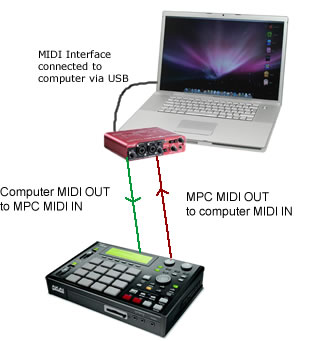
This connection is called the ‘midi handshake‘ and is the configuration I tend to have set up permanently as it covers most simple day-to-day MIDI requirements. Here both devices can always communicate via MIDI in both directions without having to re-route MIDI cables. And not only will this cover your syncing requirements, it also covers two-way traffic for all other MIDI data. For example, the MPC can send MIDI data to a computer VST instrument, but equally, the computer can send MIDI data back to the MPC which can then be used to trigger MPC sounds or be recorded into the MPC sequencer.
As with the previous examples, there will also be software configurations to consider as your MPC needs to be told which MIDI sync protocol to use and which MIDI port to send or receive the sync data from – this set up varies between each MPC model. Additionally your computer DAW will also need to be configured correctly and this will depend on the specific DAW you are using. Check out my many ‘MPC-DAW’ books to see if I have written one for your unique set up (my books cover the exact set up for all standalone hardware MPCs, and at the time of writing cover Pro Tools, Reason, Logic and Ableton Live). I intend to write books for all the most popular DAWs, so please let me know which DAW book you’d like to see next and I’ll move the most popular request to the top of the list!
What’s Next?
I hope this introduction to MPC MIDI has helped you understand some important MIDI concepts. Yes MIDI can get more complicated when you introduce additional MIDI devices with more complex requirements, and we’ll look at some examples of that in a different article, but for many MPC beat makers, especially those working with a computer DAW, the configurations listed here will serve you well for the majority of day to day beat making duties.


55 Responses
Leave a Reply
Latest Posts
Pro Studio Kit 3.5 - Now With MPC Sample & MPCe Pad Support
Electric Bass 3 - Now With MPC Sample & MPC3 Support
MPC Bible 3, Revision 6 - MPC Oscillators, MPC 3.9, MPC One G2 + MPC Key 37 G2

Downbeat Kit 3 - Acoustic Drum Kit Expansion For MPC3


Dec 16, 2012 4:59 pm
hi there, will you be doing a using mpc studio with cubase book or do you have information on how to correctly use/set up, the mpc as a vst instrument to record to a midi track in cubase at the moment i can create a mpc vst track which also creates a midi track in cubase i then also create a audio track and group that with the vst track as shown at noterepeat .com this is when i run into problems
.i want to use the mpc studio in cubase as the drum machine/sampler i have an motif xf for keys and that.
what i want to do is record midi data to the midi track from the mpc to cubase, the mpc program runs and i get sound and this sound is detected in the audio track and the vst track of cubase .
i’m just having problems with the midi .
i’ll try to explain the setup
mpc set to midi in the instrument panel
in cubase i have the midi ports set to -midi output routing /mpc midi in (as shown on noterepeat set up)
midi input routing / mpc midi out (when i hit the pad the the pad stays flashing and the midi meter bar signals a reading of the pad flashing when i disconnect the out i then get no midi)
from what i can gather the mpc midi mode is for controlling external midi instrument as i cant load any samples from the mpc content to the pads so i dont think i would use that mode in cubase to control the mpc plugin unlike what the noterepeat setup said
if i set the mpc to mpc in the instrument tab i can the load drum kits etc the pad sounds are picked up by the audio channels in cubase as i said earlier but i still have no midi signal unless i set the midi input channel of cubase to my motif xf main port,turn local off on xf then i can trigger the sound from the mpc in cubase via the keyboard and i get a midi reading and the pad flashes and sound when i hit a key but still not with the pad
I’m confused now because the keyboard triggers pads cubase sees it mpc sees it but the pads don’t trigger midi
Ive tried searching for info and sat here for hours and played with different settings the best i can get is to record mpc midi via keyboard in cubase or record mpc midi in its daw then record the audio into cubase
I’ve tried the iac driver thing on the mac don’t know if i done it right and i tried input transformer which someone was on about online but again i don’t know if i did this right as i haven’t used this before.
if you get a chance could you maybe help me solve this problem
Dec 21, 2012 2:04 pm
Id like to see you write a book on syncing my Mpc to Presonus Studio One.. If you have any information on that it would be greatly appreciated..
Dec 21, 2012 2:24 pm
Hi – I’ve added Presonus Studio to the book request list – thanks for your suggestion!
Mar 3, 2013 4:41 am
So if I wanted to use a synth keyboard (in this case, a Roland HS-80) to function as a MIDI controller for playing/sequencing rack synths with my MPC, I’d probably set the HS-80 to “local off” or something like that, right? I’d then turn it back on for when I want to sequence the HS-80? (Or I guess that I could just not have any audio cables plugged in, or have it muted…)
Mar 17, 2013 2:19 am
Hello – I want to sync my mpc5000 to my kaoss 3 pad do have any experience with that? If so any tips or thoughts? Thank you
Mar 17, 2013 7:50 am
I’ve not used the Kaoss 3, but from what I understand, there should be no problems using your 5000 with it. Connect the MPC5000 MIDI out to the Kaoss MIDI IN and vice versa, set up a MIDI track in your 5000 sequence, set a MIDI channel, and you can then record all your Kaoss touch pad operations to your MPC sequencer and then play the sequence back to recreate them in the Kaoss. I also assume you could use the BPM detection function in the Kaoss to apply effects to any audio from the 5000, just like you do any audio source.
Mar 19, 2013 4:47 pm
Thank you for your response. I’m most interested in achieving the latter of the two scenarios you presented with for the KP3 and 5000. But I am still unable to do so. I wonder if you have any more insight on how I would apply effects to the 5000 using the KP3 .
Mar 19, 2013 3:44 pm
Any ideas on how to sync my Akai MPK49 via MIDI with my MPC 1000 to record Vst’s sequences into the MPC?? I tried all the connections that you explain in this post , i’ve read the manual seeveral times and they say that i have to configure the MPK49 to be the OutPut 2 ( MPK49 2 OUT ) , i did it and im almost sure that is not my daw configuration , already checked that out to… dont know what else to do :S
By the way your posts are really good . in this post you explain pretty much everything that i saw in a lot of internet posts!! Cheers
Apr 24, 2013 6:25 pm
I would like to know how i can use my mpc1000 as a module inside logic for my drums. When i hit the pads the light in the logic midi track blink continuously. What could be the problem?
Apr 30, 2013 5:09 am
Hello there
Im trying to connect up my 1000 – fast track pro interface – mac, I want to sync and track out, one track at a time.
Do I put the stereo cables (audio) from my MPC to the fast track pro as well as the midi cables, and the whole signal goes through USB to the MAC, or do I put the stereo cables (audio) to the in/out put on the mac?
Much Thanks!
May 28, 2013 3:29 am
Hello,
This may be a bit old school, but I am trying to use my MPC 1000 as a multi-timbral sound source, controlled via two MIDI controllers. The first controller being an Alesis Trigger IO (to play the drum sounds with natural expression) and secondly, via a MIDI keyboard (to play keyboard-y type samples). The problem I am experiencing is that I can’t figure out how to assign the MPC’s “tracks” to accept MIDI on different MIDI channels….for example, lets say I want to play a drum sound on “Track 01” on MIDI channel 01, while my friend plays a piano sound on “Track 02” on MIDI channel 05, but at the same time. The track’s “MIDI” setting seems to behave as an output only…I am guessing.
So far, only the selected track will receive MIDI, and from both controllers. I am using an MPC 1000 with JJ OS 3.15. Is there a work around? Am I an idiot? I’ve looked through the manual, but am not seeing the solution. Any help is greatly appreciated.
::casio
May 28, 2013 3:47 am
Sorry,
Just read it on the JJ website. I need JJ OS 2XL. But only after following links from this site…thanks for keeping hardware alive!
::casio
Jan 5, 2018 3:03 am
It does respond to multiple midi channels at once .. It’s a major over sight on the unit , and a draw back ..
Jul 10, 2013 8:34 pm
hello ,
I have a question ,
i want to use a midi keyboard on my mpc 1000, to play some bass with . the mpc doesnt play under B0 .
what solution do you suggest for ? i would like at the same time use somle sounds on some A and B bank while i m playing with my midi keyboard !
thank you so much for your help
Fixi
Jul 10, 2013 8:41 pm
Just use the program file I created in my recent tutorial:
http://www.mpc-tutor.com/low-midi-note-mpc-program-template/
Jul 15, 2013 6:35 am
trying to connect my mpc4000 and mo6 to my pc via presonus firepod using studio one software I will take any help I can get thank you in advance
Jul 18, 2013 3:19 pm
Hello, I have the Akai MPC Pro Studio.
How can i use my MIDI keyboard to change the pitch???
For example… I have a sample and i want to pitch it up. Can i set the original tonality to a key (ie C2) and then change the pitch by pressing another key (ie pitch up by pressing E2) ????
Thank you very much for your help in advance 😀
Aug 27, 2013 5:32 pm
HI
I have midi problem with my mpc 1000. My setup connection look like this: midi output from DAW is connected to MPC 1000 midi in , midi out from MPC 1000 is connected to VIRUS C midi in (typical chain connection).
I want to make all of my midi track`s on the DAW. For example: i want to make beats on midi chanel 10 using MPC as sound module and the rest of the tracks (bass, leads etc.) on my virus on different chanels 1-8, and play it on the same time (don`t want to rec all thats tracks at the same time on to MPC).
Can`i do this ?
Sep 4, 2013 3:05 am
Thanks for this tutorial! I also own your MPC/Ableton live book. I was wondering if you could help me with what I believe is an issue: I own a really nice audio interface, the Apogee Duet. Needless to say It is audio only with no midi interface. I use it for my monitors patched through a Mackie mixer and for recording bass, guitar, etc. I also just bought a used m-Audio 4×4 midi box. So now I have two interfaces but I am not sure if it’s possible to run them at the same time in order to have both audio and midi in Ableton live 9. After reading your Ableton book wherein you said we needed an interface that contained both audio and midi to proceed using the MPC with Ableton, I decided to go out and buy an Akai Professional interface. But two different salesmen refused to sell it to me because they insisted I didn’t need it; that I simply had to run the Apogee through one usb port and a $20 midi to usb cable into the other usb port on my Mac and take it from there. this seems impossible though because Ableton only allows for one midi interface. Am I missing something here? Thanks in advance for your thoughts!
Sep 14, 2013 5:02 am
I’m totally new to mpc ren but I’m still an avid user of fl studio producer edition. Does the mpc ren have vsts like Sakura and vsts for piano. I’m sorry if this is a stupid question but some feedback would be truly appreciated
Oct 4, 2013 5:25 pm
Hey I have an MPC 5000 and want to get an interface so I can record live from my mpc into my computer. I am looking to buy an interface that is not to expensive but good quality, the Native Instrument Komplete Audio 6 is what I am thinking. Does anybody know anything about the audio 6 whether it is a good interface or know of one I should get? Let me know thanks a lot!
Nov 30, 2013 5:38 am
I honestly have no clue how to use the midi from my akai mpc 500 to Reason 6.5. I have the midi cord and everything i need. It simply won’t work for me. Any suggestions?
Dec 6, 2013 9:50 pm
Need help on the akia mpc 2000xl. Thanks
Dec 9, 2013 1:01 pm
Here you go:
http://www.mpc-samples.com/product.php/48/beat-making-on-the-mpc2000xl/
Jan 17, 2014 7:13 pm
Hello, I am using Studio One DAW with the Akai MPC Studio PRO, I am having the most trouble mapping between my devices. Can you assist me please?
Feb 5, 2014 6:20 pm
I have a mpc renaissance connected mid mid October in a Fantom X8
I basically used as a controller for mid VSTS
but now I’m trying to play and record the internal sounds of the Fantom x8 sequencer mpc
and even changing their configurations to master the sound does not come out in mpc
Should I call beyond the mid jacks cables 1 4
Feb 8, 2014 7:48 pm
Playing instruments on MPC 5000:
Hello and thanks for this article! Looking to buy an MPC5000 and Wonder if I can load a s5000/s6000 cd into the MPC and play it as a normale *.akp instrument? For instance, can I load a string “patch” into the MPC and play it on a keyboard?
In other words, can I use the MPC as a standard sampler, like i would With a s5000?
Mar 2, 2014 12:23 am
hi, I am using FL Studio with the Akai MPC 4000, I am having the trouble to put my drum kits. Can you assist me please?
Mar 7, 2014 6:36 pm
Im Stuck!! I have the Akai MPC 5000 ….. NATIVE INSTRUMENTS KOMPLETE 8 ULTIMATE … & FL STUDIO 11 PRODUCER EDITION INSTALLED ON A CUSTOM DESK TOP PC ….a Scarlett midi interface & a mpk 49 midi controller !! What im trying to do is play The sounds from NI Komplete with the mpk 49 midi/into the MPC 5000s Sequencer!! One time i got as far as controlling the vst with the 5000 and it was playing back but when i tried going to another midi track & sound what i had recorded on midi track a1 was gone!! I need to know exactly what im not doing rite because im fixed on makeing my beats in my mpc 5000!! An email would be cool but please call me on this matter asap!! 769 223 2229 thanks & hope to hear from someone soon!!!
Jun 2, 2014 8:13 pm
hello dear people!
I have been trying unsuccessfully 2 google how to setup my Mpc 2000XL (as master) with Korg Triton (as slave)so I can layer tracks with different sound banks from Korg. I managed to fix it on my Yamaha mini Motif and I could change Tritons sound banks in my MPC sequencer. Now I have no idea. Please help been struggling for few months! anyone who help me with this I make a free beat or send a postcard from StockTown Sweden 😉 Peace!
Sep 27, 2014 12:50 pm
My mpc 2500 is not recording midi notes from my fantom g. I can record using the pad on the mpc but not playing straight from the fantom
What can i do to fix this.
Oct 30, 2014 1:39 am
I like to know after reading your tutorial does the same connection work for FL studio 11 with a MPC 500. I have a lambda interface usb, 2 midi cables, and the MPC 500. I can’t get the DAW on FL to seem to work with the MPC? If you can share with me a step by step diagram or video would be great! thank you and keep feeding us with your knowledge.
Oct 31, 2014 1:01 pm
hi
is it possible to record midi data from the roland tr8 into mpc3000 then use the mpc to essentially play the tr8 that way i can link various sequences of drums etc ?
cheers
Grayster
Oct 31, 2014 1:05 pm
Yes, absolutely.
May 22, 2015 5:22 am
Im trying to do the same thing, use my mpc 300 LE but it won’t work for some reason, can u help? It works ok with the original 909 but i can seem to get it to work with the tr 8
May 22, 2015 9:18 am
I don’t have a TR8, but if it has a MIDI IN and you can assign its sounds to specific MIDI channels, then any MPC should be able to trigger its sounds via MIDI.
Nov 12, 2014 5:01 pm
why when i sync my mpc 4000 to logic x the sync is ahead to the right? not locked to the grid.
Dec 4, 2014 4:37 am
I have an issue where I am trying to use my Akai MPC 2000XL as a tone generator(sound canvas), & a sequencer, being controlled by my general midi keyboard.
In other words, I’m trying to play the sounds I load in my MPC by using my general midi keyboard.
Like if I load a piano sound, I’m trying to play the piano from the MPC using my keyboard.
At this point, I will load sounds into my 2000XL, each pad has a different sound.
When I play my keyboard, it plays exactly the way the pads are.
I’m trying to only play the sound I choose on my keyboard.
So if pad 1 has a piano, & pad 2 has a horn, how do I get my keyboard to play only the piano, or only the horn, & play the correct note with each key?
Hopefully you understand what I’m trying to say. In other words once, or if I am able to play one instrument at a time from the 2000XL on my general midi keyboard, will I be able to have completely control as with a regular sound canvas, or will every key play the same note pitch, & will I be able to use my pitch & modulation wheels, sustain pedal, etc.?
I hope I was not overwhelming, I just tried to explain in detail as best as possible..
“Happy Holidays” to you & yours..
bless your success..
Thank you..
Dee
Dec 4, 2014 10:13 am
The MPC2000XL is not able to apply MIDI control signals such as pitch, modulation wheel or sustain pedal to samples. So for example, you cannot load a piano sample to a pad and bend it with the pitch control on the keyboard. The MPC2000XL does not have the required sampler synthesis features to deal with this – you will need either an MPC4000 or a dedicated fully fledged sampler (Akai S or Z series etc). The MPC2000XL sequencer can record the MIDI info itself, so you can in turn send pitch bend and modulation info to a MIDI sound module, but you cannot apply it to MPC internal samples.
Beyond that, you can certainly create ‘multisample’ programs on the MPC2000XL, which will allow you to use a keyboard to play, for example, piano samples in chromatic order. If you only have a single sample, then use 16 levels or ‘autochromatic’ tuning but the results will sound poor as the sample gets tuned too excessively, if you have multiple piano samples you can manually configure the MPC pads to run in chromatic MIDI note order and assign your samples according to their pitch and use the pad tuning features to compensate for the missing notes (the tuning range in these examples are more subtle and therefore sound much better the more samples you use). Again, the MPC2000XL is not a fully fledged sampler so there are no native key group program like the MPC4000/5000/MPC Software have, so in the MPC2000XL you have to manually create mimic one using a DRUM program.
I cover how to do all this in my book:
http://www.mpc-samples.com/product.php/48/beat-making-on-the-mpc2000xl/
I also have ready-made multisample programs for the XL here:
http://www.mpc-samples.com/product.php/116/mpc-multisample/
Hope that helps
Dec 4, 2014 6:52 pm
I have a Korg Triton ProX88 Key and would like to run it and its sample banks through my Mpc 2500 i have setup the cables and the MiDi settings on the keyboard however it is still only playing the assigned pads from the MPC on the keyboard rather than the sample sounds from the keyboard into the MPC what am i missing?
Dec 3, 2020 6:25 pm
I’m trying to do the same with no success yet. You have any luck??
May 11, 2015 3:05 am
Hi!
I have an MPC 4000 and I would like to trigger keygroup programs on it via midi across a full keyboard. Rather than buy a new USB style one I thought I could get another old sampler to also add to the arsenal. So my question is, would an old keyboard like an Ensoniq EPS or Roland W-30 be fine for triggering an MPC 4000 via midi?
Thanks for your help!
Jul 24, 2015 11:31 pm
Hi Sam here, just baught an Ensoniq Eps 16 plus RACK and having big troubles connecting it via midi to my MPC 1000. would be very nice if someone could assist me as its taking far longer than expected. i know how to connect my akai s900 to the mpc with no problems but this seems like theres someting i need to now about the eps itself.
Aug 5, 2015 4:34 am
I have an MPC 5000 and I would like to sync it up with FL STUDIO in order to track out. Also I would like to know a configuration that would work with the ASR 10, what I want to do is sample in the ASR and chop them replay my sample, then sync that with the MPC to create the drum pattern. Can you help me with either. Thanks
Aug 11, 2015 1:16 pm
i have mpc2500 i connect to my keyboard psrs910. but not connected plz reply
Sep 17, 2016 1:17 am
Hey there! Could I have the link to this other article you are talking about? Talking about triggering samples assigned to a DRUM program
Sep 17, 2016 7:59 am
Hi. Any references in the article are to my MPC ebooks here: http://www.mpc-tutor.com/section/akai-mpc-tutorials/
Jan 10, 2017 4:27 am
Hi, I’ve been trying to link my Bass Station 2 with my MPC 2000XL via midi but, have been unsuccessful. What I’m attempting to do is chain the BS2 to the MPC so I can freely play the chords I want on the keyboard while the MPC is in “record” mode. I’ve adjusted the parameters and the MPC is receiving a signal when I check the midi monitor signal. Yet, there’s no sound when I hit the playback button on the MPC. Appreciate any guidance and especially your time in responding!
Mar 7, 2017 8:52 pm
please some one can help me how to do pattern merging in Akai MPC 2000xl
Mar 28, 2017 4:36 pm
bonjour,
j’ai envoyé un mail concernant les difficulté d’enregistrement de ma mpc renaissance
je l’avais déjà installé sur le même macbook que je viens de réinitialiser sans faire de sauvegarde malheureusement
j’essaye de la réinstallé mais votre site me bloque m’informant que ma renaissance est déjà installé sur plusieurs poste
aidez moi s’il vous plais pour valider ma renaissance
cordialement
Jul 18, 2017 5:10 am
How to record a sound from a keyboard into mpc live and used it as a patch on a controller playing the full range of the keyboard.
Aug 10, 2017 2:09 am
I am trying to midi my mpc5000 to an Roland FA06 and a Motif RAck es. I am not having any success at all and I can not find any info online. I have the Midi out (a) going to midi in of Roland and the Midi out of the roland going into the midi in of the MPC. I have Local control turned off on roland.. I have been trying everything but 1 i can not play keys on the roland and it is recorded into the mpc sequencer. 2 i keep locking up the mpc everytime i try and do anything concerning midi.
under the sync section of the MPC i have active tracK: multi, soft thru omni ab, midi program: track, pad internal sound: on.
Please help.
then I have an audio interface and i dont know how i am going to incorporate that too, sorry to sound so frustrated but its killing my workflow and creative process.
May 8, 2018 7:55 pm
Hi,
Can I use my MPC 1000 with JJOS128XL to control external synths without a MIDI Keyboard, just from the pads?
Thanks!!
Jan 23, 2021 10:53 pm
I like to know after reading your tutorial does the same connection work for FL studio 20 with a MPC 500. I have a lambda interface usb, 2 midi cables, and the MPC 500. I can’t get the DAW on FL to seem to work with the MPC? If you can share with me a step by step diagram or video would be great! thank you and keep feeding us with your knowledge
Feb 6, 2023 6:14 am
i’ve just noticed a midi thru bug using JJOS 3.13 on an MPC 2500
while using an external sequencer going through the mpc, i’ve found a way to drop note offs, leaving some hanging.
if you overlap the same note. via external input.
1.1.0 C3 Note On
1.2.0 C3 Note On
1.3.0 C3 Note Off
1.4.0 C3 Note Off
outputs
1.1.0 C3 Note On
1.2.0 C3 Note On
1.4.0 C3 Note Off